Bills by paycheck, not by calendar month
Paycheck Bill Planner
Your bills stay monthly. Your biweekly paydays keep moving. Enter each bill once, choose One time, Weekly, Every 2 weeks, or Monthly, and the planner places every due date between your next two paydays, even when the pay window crosses into a new month. See which bills this check must cover, how much to leave in the account, and what is left before payday.
One ZIP. Opens in your browser. Use WELCOME10 for 10% off.
A complete two-payday example
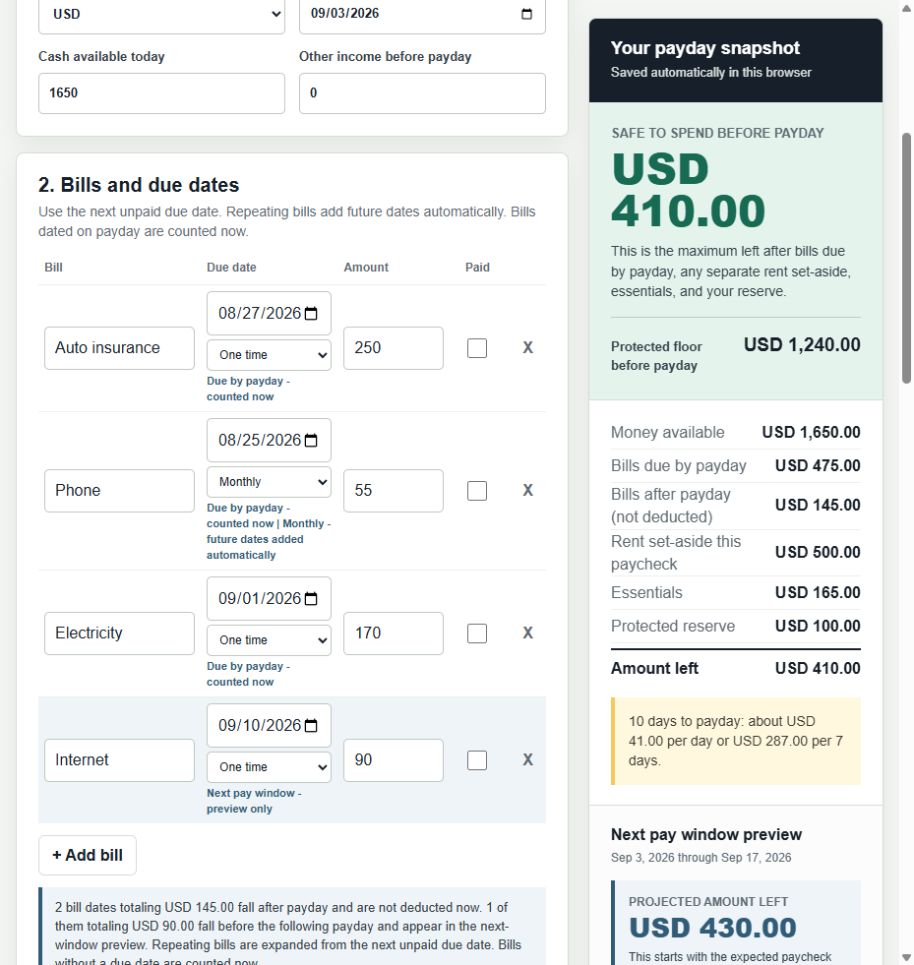
See exactly where the $1,650 goes
In this example, $1,650 is available today. $475 covers bills due before payday, $500 is this check's rent set-aside, $165 covers essentials, and $100 stays as a reserve. That leaves $410 before payday. The next paycheck is calculated separately.
Bills, this paycheck's rent set-aside, essentials, and reserve.
The most left after the protected amount, not a spending target.
After $870 is protected in that window. Future income stays separate.
New 35-day view
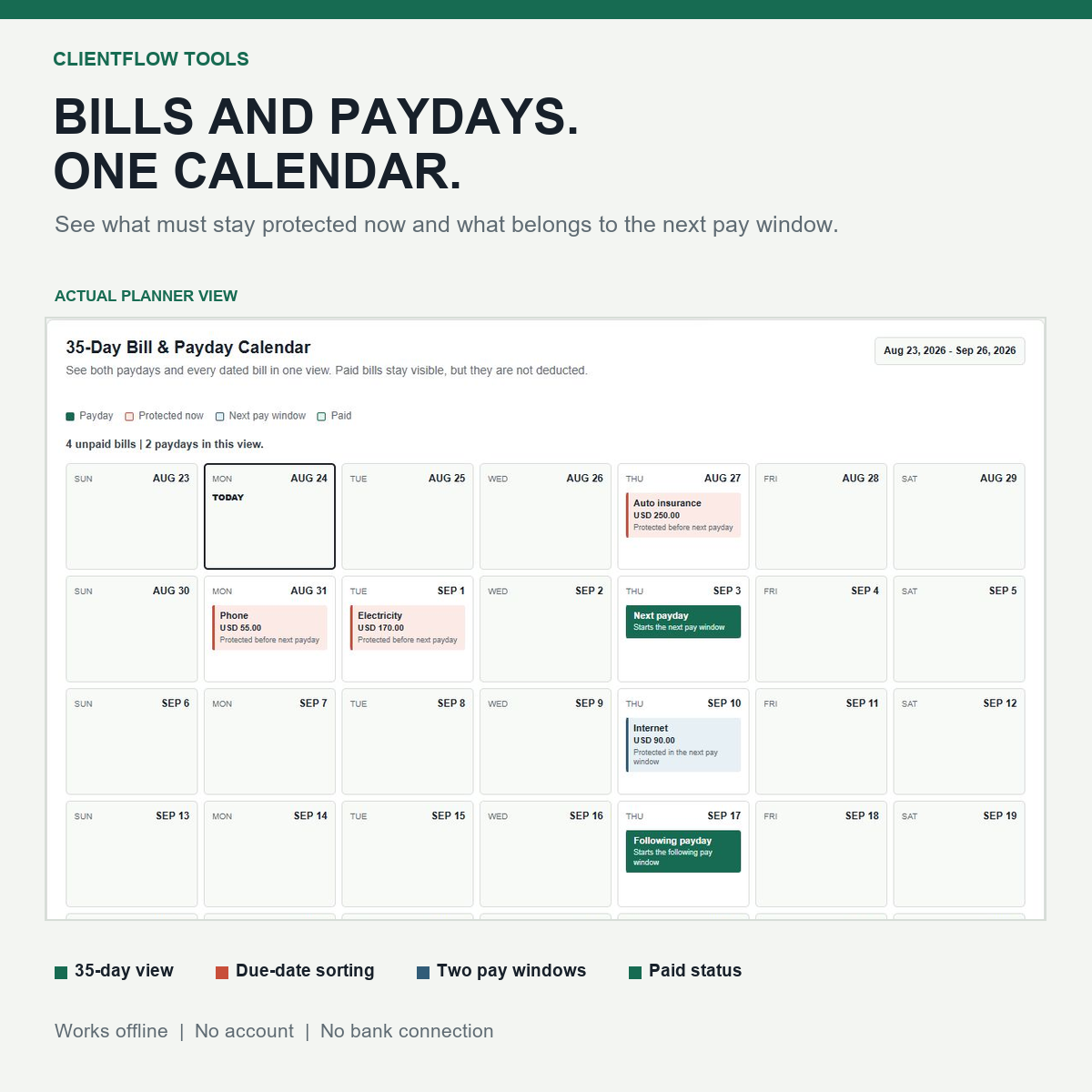
See every bill between two paydays
The 35-day calendar builds itself from the paydays and due dates already entered. It keeps bills on the correct side of payday without another monthly worksheet to update.
- Protected nowBills included before or on the next payday.
- Repeating datesWeekly, every-two-weeks, and monthly bills appear again automatically.
- PaidThe completed date leaves the totals; later recurring dates remain planned.
Inside the download
Exactly what the $7 download includes
Extract the ZIP once, then open the planner in a modern browser. Nothing needs to be installed and the amounts stay on the device.
- 1Offline browser planner. Add bills, dates, and one-time, weekly, every-two-weeks, or monthly schedules. Future due dates are added automatically. Same-day bills are counted now and clearly flagged. Include both pay windows' rent set-asides, essentials, and reserve; then save locally, print, or create a backup.
- 2Six-page printable PDF. Use paper for the current pay window, the next pay window, bill review, and notes.
- 3Start Here guide. See which file to open and the shortest path to the first result.
Three steps
Enter it once. Check three answers.
- EnterMoney available, the next two paydays, unpaid bills, rent set-asides, essentials, and reserve.
- ReviewConfirm which bills fall in each window and count each rent amount only once.
- UseKeep today's flexible amount separate from the next-paycheck forecast before deciding what to spend.
What the planner does not do
It does not connect to a bank, pay bills, predict unexpected costs, or provide financial or debt advice. Enter and verify every amount, due date, pending transaction, and posting rule yourself.
An unpaid bill dated on payday stays in the current protected amount. A matching date does not prove the paycheck will be usable before the bill is drafted, so confirm payroll release, bank availability, and biller timing.
Before you buy
What exactly do I receive?
One ZIP with an offline browser planner, a six-page printable PDF, and a short Start Here guide.
Does it connect to my bank?
No. You enter and verify your own dates and amounts. The planner does not access an account or move money.
What if a bill is due on payday?
The planner counts an unpaid same-day bill in the current protected amount and flags it. Confirm when payroll releases the deposit, when your bank makes it available, and when the biller drafts the payment before relying on that deposit.
How do recurring bills work?
Enter the next unpaid due date, then choose Weekly, Every 2 weeks, or Monthly. Later unpaid dates are added automatically across the planning horizon. Monthly bills keep the selected day when that date exists and use the last day in shorter months.
Does it work when a pay period crosses into a new month?
Yes. The planner follows the payday and due dates you enter instead of resetting at the end of a calendar month. A bill stays in the pay window that must cover it.
Is this a subscription?
No. It is a one-time $7 purchase for one person or household. The planner is best used on a laptop or desktop.
How do I know what rent amount to enter?
Use the free Rent Set-Aside Calculator first. It calculates either the amount needed from the paychecks before the next rent deadline or one recurring transfer for every standard paycheck.
Can I try something free first?
Yes. Use the free bill sorter for one current list of up to six bills. The paid planner adds rent set-asides, repeating bills, essentials, a reserve, the 35-day calendar, local saving, backup, and printable pages.
One-time purchase
Know which bills this paycheck covers before you spend the rest
Use WELCOME10 for 10% off.